Slow down a song to learn guitar, piano, or drums
Upload the track, set 75% or 50%, and play along in the original key. When the part is clean, bump tempo in 5-10% steps until you reach 100%.
Change song speed without changing pitch. Upload MP3, WAV, or FLAC, slow down for practice or speed up podcasts, preview in real time, and download privately in your browser.
Free online tempo changer for MP3, WAV, FLAC, M4A, AAC, and OGG files. Preview and export run locally in your browser with no server upload.
Continue after changing tempo — detect BPM, shift pitch, or brand your track.
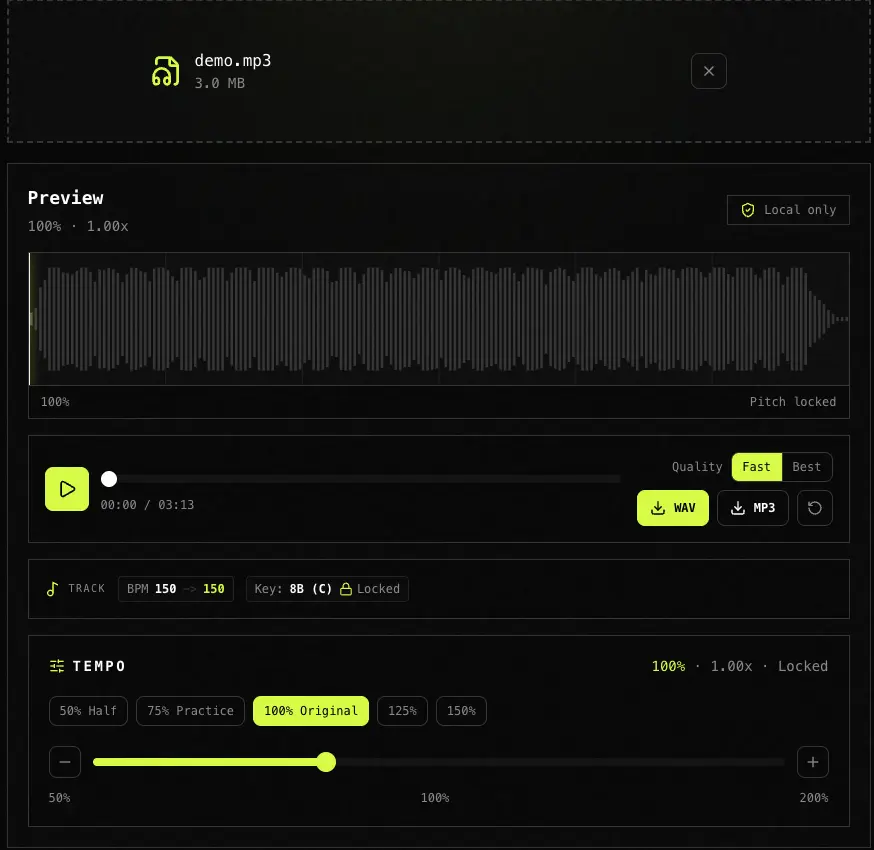
You upload an audio file, drag a tempo slider, and hear the speed change in real time from half speed to double speed while the pitch and musical key stay the same. When it sounds right, export WAV or MP3. No server upload, no signup, no DAW required.
| Good fit | Not ideal for |
|---|---|
| Full songs, drum loops, vocals, podcasts, and lecture recordings you want to slow down or speed up while keeping natural pitch | Live microphone input, streaming URLs, or cloud-only editors that require uploading unreleased masters |
| Practice at 50-75%, speeding up podcasts at 125-150%, and private browser processing before release | Extreme stretch below 50% or above 180% on compressed MP3, batch-processing hundreds of files, or replacing a DAW stretch workflow |
Drag and drop or click to browse MP3, WAV, FLAC, M4A, AAC, or OGG. The file stays on your device; nothing is uploaded to a server.
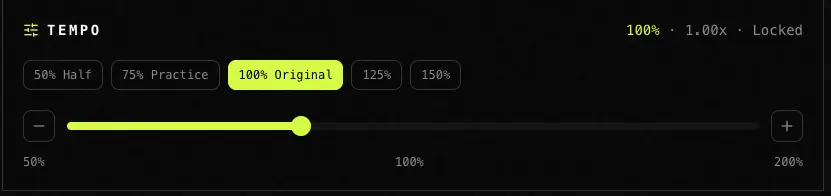
Tap a preset or drag the slider from 50% to 200%. The browser preview updates instantly, while local Rubber Band processing is used for export.
Click WAV or MP3. The tool renders the file in a Web Worker with a progress bar and generates the export locally.
We compared price, privacy model, real-time preview, pitch preservation, and BPM helper UI. TagMyBeat is our own product, so treat this as a decision guide and verify on your own files before trusting any row.
| Tool | Best for | Price | Privacy | Real-time preview | Pitch preserved | BPM helper |
|---|---|---|---|---|---|---|
| TagMyBeat | Instant slider preview plus estimated BPM before and after, all local | Free | Browser only | Yes | Yes | Yes (Essentia) |
| SoundTools | Preset speeds and same-format download | Free | Browser (claimed) | Separate Preview button | Yes | Explained in text only |
| AudioTrimmer | One-off speed change when upload is acceptable | Free | Server upload | No | Yes | No |
| Audacity | Desktop offline editing, extreme curves, and batch work | Free | Local files | Offline only | Yes | Manual tap tempo |
| YouTube playback speed | Quick listen in browser | Free | Streaming | N/A | No | N/A |
Upload the track, set 75% or 50%, and play along in the original key. When the part is clean, bump tempo in 5-10% steps until you reach 100%.
Set 125-150% to finish a long episode faster. Time-stretch keeps voices natural, and MP3 export lets you listen offline in any player.
Run the track through BPM and Key Finder first, slow or speed here for practice versions, then use Pitch Changer only when you need harmonic shifting. For TikTok-style slowed + reverb vibe edits, use Slowed and Reverb Maker at /tools/slowed-reverb-maker.
Detect BPM/key on a reference beat, slow an acapella for transcription, then shift pitch to match the beat key before dropping both into your session.
Export the same file at 60%, 70%, 80%, 90%, and 100%, then A/B the versions in your DAW against the instrumental.
Based on user feedback and search queries, last updated June 2026.
A tempo changer, also called a music speed changer or audio speed changer, adjusts playback speed without changing pitch. Time-stretch algorithms keep voices and instruments in the same key while only the pace changes.
Upload your MP3 or WAV, tap 75% or 50%, and listen in real time. Download when ready. Your instrument stays in standard tuning because pitch does not shift.
Yes. Tempo and BPM scale together: 75% of 120 BPM is about 90 BPM. TagMyBeat shows estimated original and shifted BPM in Track when browser analysis succeeds.
Use the tempo percentage as the BPM multiplier: 75% turns 120 BPM into about 90 BPM, and 150% turns 98 BPM into about 147 BPM. Track shows the estimated original and shifted BPM when analysis succeeds.
Tempo changer means speed only with key locked. Pitch changer means key only with speed locked. Use this page for slowing down or speeding up; use Pitch Changer to transpose by semitones. For slowed + reverb atmosphere (tape pitch + reverb), use Slowed and Reverb Maker at /tools/slowed-reverb-maker.
No. Decoding, time-stretch preview, waveform drawing, BPM/key estimation, and export run locally via Web Audio API, WebAssembly, and Web Workers.
Not directly. Download or export audio you have rights to use, then upload the resulting MP3 or WAV here. YouTube speed control cannot export a processed file.
Extreme stretch stresses any time-stretch engine. Moderate changes from about 60-150% usually sound more transparent, especially with WAV or high-bitrate MP3 input.
Yes. Browser tools such as BPM Key Finder, Pitch Changer, and Tempo Changer are free with no account because the analysis and editing work stays local and does not consume server compute.
Detect BPM/key, slow down or speed up here, then shift pitch only when you need harmonic matching.
Explore more tools for producer tags, remix prep, and audio branding.