TagMyBeat
Free Online Slowed and Reverb Maker

Free Slowed and Reverb Maker

Upload any song and make a slowed + reverb version online. Adjust speed, reverb, and vibe — preview in real time and download MP3 or WAV privately in your browser.

MP3, WAV, FLAC, M4A, AAC, or OGG · Max 100MB · Local only — preview and export stay in your browser.

Useful next tools

Need pitch-locked speed only, or harmonic shifting? Continue with these tools.

Overview

What This Slowed and Reverb Maker Does

You upload a song or audio clip, slow it down, add spacious reverb, and hear the classic slowed + reverb vibe in real time. When it sounds right, download the full track as WAV or MP3. No server upload, no signup, no DAW required.

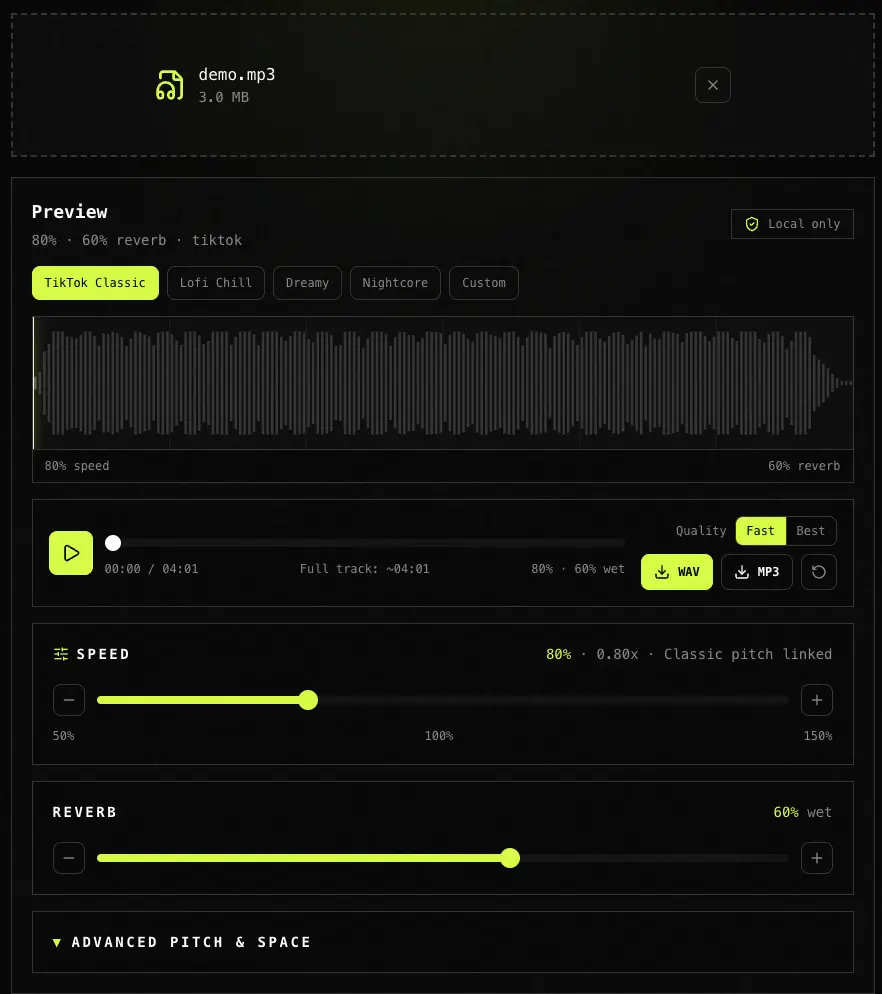
Full slowed and reverb maker interface with waveform, transport controls, vibe presets, and speed and reverb controls
A full slowed + reverb workspace after upload: waveform, vibe presets, preview controls, export quality, and speed/reverb shaping without sending the file to a server.
Good fitNot ideal for
Full songs, stems, or loops you own and want as slowed + reverb edits for TikTok, YouTube, or study playlistsSearching for a specific celebrity track's slowed MP3 — we don't host or link copyrighted downloads
MP3, WAV, FLAC uploads with preset vibes (TikTok Classic, Lofi, Dreamy) plus manual slidersPasting a YouTube or Spotify URL — export audio you have rights to use, then upload here
Private browser processing of demos, voice memos, and beat previews before social postsReplacing a full DAW mix session with automation, sidechain, and multiband mastering
Quick daycore / nightcore experiments with optional bass boostBatch-processing hundreds of files — use a desktop DAW for library-wide jobs
Workflow

How to Make a Slowed and Reverb Song Online

  1. 1

    Upload your audio file

    Drag and drop or click to browse MP3, WAV, FLAC, M4A, AAC, or OGG. The file stays on your device — nothing is uploaded to a server. A waveform appears after decoding.

  2. 2

    Pick a vibe and fine-tune speed + reverb

    Start with TikTok Classic (80% speed, Hall reverb) or choose Lofi / Dreamy. Drag the speed and reverb sliders, switch reverb space (Room to Cathedral), and hear changes instantly. Use Classic pitch for the tape-style daycore tone, or Pitch locked if you only want slower tempo without lowering the key.

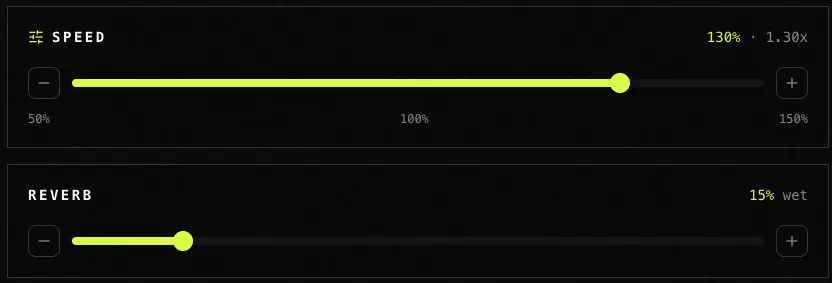
  3. Slowed and reverb controls showing speed, reverb wet mix, pitch mode, space, and bass boost options
    Shape the edit with speed, wet reverb, room size, pitch mode, and bass boost before exporting.
  4. 3

    Download your slowed and reverb track

    Click Download WAV or Download MP3. The tool renders the full file in a Web Worker with a progress bar. Export is generated locally and never touches our server.

Comparison

Which Slowed + Reverb Generator Should You Use?

We tested four tools on the same 3:00 vocal + pad track in June 2026. Dimensions: price, privacy, real-time preview, preset quality, pitch modes, and export format. TagMyBeat is our own product — verify on your files before trusting any row.

ToolBest forPricePrivacyReal-time previewPresetsPitch modesExport
TagMyBeatPresets + instant preview + Classic/Locked pitch, all localFreeBrowser onlyYesTikTok / Lofi / DreamyClassic, locked, manualWAV + MP3
SoundToolsExplicit Preview button, pitch-preserved slowFreeBrowser (claimed)Separate PreviewTikTok / VaporwavePitch preserved defaultSame as upload
slowreverb.comQuick one-slider jobs when upload is OKFreeServer uploadLimitedMinimalVariesMP3
ACEStepConvolution reverb presets + pitch/speed splitFreeBrowserYesHall / CathedralLinked or manualWAV
AudacityOffline multitrack, extreme automationFreeLocal filesOffline onlyManual pluginsFull controlAny format

TagMyBeat: Choose TagMyBeat if you want a free slowed and reverb maker that runs in your browser, starts with sensible TikTok-style presets, and lets you preview speed and reverb while choosing classic tape pitch or pitch-locked slow — without uploading your file.

Audacity: Choose Audacity if you already mix in a DAW and need offline batch edits, plugin chains, or release-ready mastering.

SoundTools: Choose SoundTools if you prefer an explicit Preview step and pitch-preserved slow as the default — still a solid local option.

YouTube playback speed: Choose YouTube playback speed only for casual listening — it cannot add reverb, cannot export, and changes pitch with speed.
Use Cases

What People Use a Slowed and Reverb Maker For

Most common

TikTok and Reels mood edits

Upload your clip, use TikTok Classic (80% + Hall), export MP3, and drop into CapCut or Premiere. The slowed + reverb generator workflow beats rebuilding the effect with separate speed and reverb plugins for a one-off post.

Lofi study and late-night playlists

Lofi Chill (85%, lighter Room reverb) keeps vocals intelligible while adding distance. Pair with ballads you already have — not pirated downloads — for personal playlists.

YouTube vlogs and aesthetic compilations

Dreamy preset (75% + Cathedral) pushes the wet, spacious sound people associate with slowed edits. Export WAV for higher quality before video encode.

Advanced workflows

Tempo Changer vs Slowed Reverb — when to switch tools

Need only slower speed with locked pitch for guitar practice? Use Tempo Changer at /tools/tempo-changer. Need the vibe (slow + space + optional tape pitch)? Stay on this page.

Nightcore flip

Select Nightcore (faster speed, higher pitch, light reverb) for the opposite of daycore — covers sped-up remix curiosity without a second URL.

BPM Finder → Slowed Reverb → Pitch Changer

Detect tempo on BPM and Key Finder at /tools/bpm-key-finder, craft a slowed version here, then fine-tune key on Pitch Changer at /tools/pitch-changer if the beat still clashes.

FAQ

Frequently Asked Questions

Based on search queries from our keyword research, last updated June 2026.

What is a slowed and reverb maker?

A slowed and reverb maker (also called a slowed and reverb generator) takes audio you upload, reduces playback speed, adds reverb for space and atmosphere, and often lowers pitch slightly for a dreamy daycore feel. It is the remix style popular on TikTok and YouTube — not a site for downloading someone else's slowed MP3.

How do I make a slowed and reverb song online?

Upload MP3 or WAV, pick TikTok Classic, preview, then download. To customize, drag Speed toward 75–85% and Reverb toward 50–70% with Hall space. Everything runs in your browser.

Can I slow and reverb any song I upload?

Yes — for files you have the right to use. We do not provide copyrighted song downloads; you bring the audio. Supported formats: MP3, WAV, FLAC, M4A, AAC, OGG.

Does slowing down change the pitch?

In Classic mode, speed and pitch move together (tape-style), which matches most viral slowed edits. Choose Pitch locked if you want slower tempo without lowering the key — similar to our Tempo Changer at /tools/tempo-changer.

Can I use a YouTube or Spotify link?

Not directly. Use a YouTube slowed and reverb generator only after you have an audio file you can legally upload. YouTube's speed control does not add reverb and cannot export a processed file.

What's the difference between this and slowreverb.com or SlowedReverb Studio?

Those sites focus on quick online processing, often with server uploads. TagMyBeat runs locally, offers named presets (TikTok / Lofi / Dreamy), and links to Tempo and Pitch tools when you need pitch-locked speed or harmonic shifts only.

Is this the same as lofi or sad song slowed reverb?

Similar vibe, different goals. Lofi Chill preset targets study/lofi distance; Dreamy targets heavy wet reverb. Sad-edit searches often want a specific chart song — we help you process your audio, not host chart downloads.

Is TagMyBeat's slowed and reverb maker free? Why?

Yes. Browser tools (BPM Finder, Pitch Changer, Tempo Changer, Slowed Reverb Maker) are free with no account. The main Producer Tag Generator uses a small daily quota for TTS — these local edit tools do not consume that quota. No watermark on exports.

How We Built This Slowed and Reverb Maker
  • Time + pitch: Rubber Band Library via rubberband-web (AudioWorklet preview) and rubberband-wasm (Worker export). Classic mode sets timeRatio and pitchScale from the same speed percentage for tape-style daycore. Pitch locked keeps pitchScale = 1.
  • Reverb: Stereo algorithmic impulse responses generated in JavaScript, convolved through ConvolverNode for preview and an offline pass in the export Worker. Four space presets (Subtle, Room, Hall, Cathedral) map to IR length and decay; wet/dry blend follows the Reverb slider (0–100%).
  • Optional bass boost: Light low-shelf EQ after reverb for the bass boosted aesthetic without a separate subwoofer plugin chain.
  • Encoding: 16-bit PCM WAV on main thread; MP3 via lamejs after the Worker returns PCM. WASM from public/wasm/ with absolute URLs passed into Workers (same pattern as Pitch / Tempo export).
  • Licensing: Rubber Band is GPL; distributed as part of a free browser tool. Commercial SDK resale would require a separate license from Breakfast Quay.

Tempo · Pitch · BPM workflow

Need pitch-locked speed or harmonic shifts only? Jump to Tempo or Pitch after your slowed edit.

More music tools

Explore more tools for producer tags, remix prep, and audio branding.