DJ crate prep
Drop a folder of local tracks, review BPM, key, and Camelot code, then export CSV for spreadsheet cleanup before you build a set.
Find the BPM and key of any song online. Upload MP3, WAV, FLAC, loops, samples, or acapellas to detect tempo, musical key, Camelot code, and duration privately in your browser.
Free online BPM finder and song key finder for MP3, WAV, FLAC, M4A, AAC, and OGG files. Batch analysis runs locally in your browser with no server upload.
Continue the workflow after checking tempo, key, and Camelot code.
TagMyBeat reads local audio files and returns the track tempo, musical key, Camelot code, and duration in one browser-based results table. Use it before remixing, DJ crate prep, sample tagging, or matching beats and acapellas without uploading unreleased audio.
| Good fit | Not ideal for |
|---|---|
| Full songs, beats, drum loops, sample packs, acapellas, and unreleased demos | Live recordings with tempo drift, free-time intros, spoken-word files, and very short clips |
| Checking BPM, musical key, Camelot code, duration, and export-ready metadata in one pass | Songs with multiple key changes, ambiguous harmony, or sections that intentionally switch tempo |
Drag and drop, or click to browse, one or many tracks in MP3, WAV, FLAC, M4A, AAC, or OGG. Songs, beats, samples, drum loops, and acapellas stay on your device because nothing is uploaded to a server.
The page loads the analysis engine on demand, then validates, decodes, and analyzes each file in your browser. Batch mode processes files one after another and keeps progress visible.
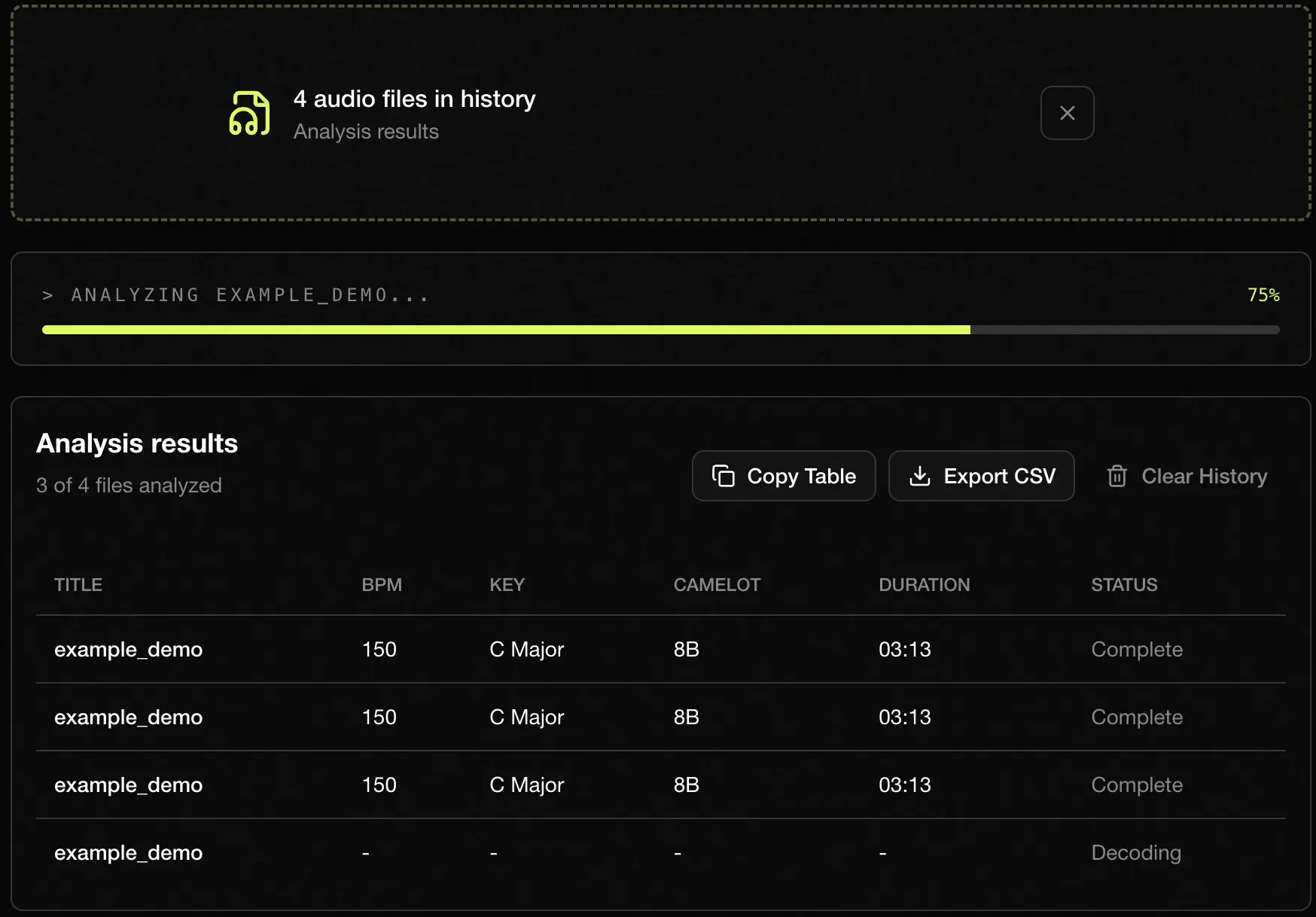
Every track is listed with title, detected BPM, musical key with major or minor scale, Camelot code for harmonic mixing, duration, and live status so you can confirm the results before using them.
Use Copy Table to paste a TSV block into Notion, Google Sheets, or DAW session notes, or export CSV results when you need the full batch in a spreadsheet or crate prep document.
We compare tools by privacy, local file support, batch export, and best-fit workflow. TagMyBeat is our own product, so use this as a decision guide and verify critical DJ or release decisions by ear.
| Tool | Best for | Price | Privacy | Batch workflow |
|---|---|---|---|---|
| TagMyBeat | Private browser-based analysis of local songs, samples, acapellas, and unreleased beats | Free | Runs in your browser, offline | Yes, with CSV and TSV export free for any number of files |
| Tunebat | You need sentiment analysis of your music | Partially Free | Runs in your browser, you must be online | No local batch export workflow, export is not free |
| SongBPM | Quick public song tempo lookups when you know the released track title | Free | Search-based public catalog | No local file batch analysis |
| Mixed In Key | Professional DJ library management and deeper preparation inside a paid desktop workflow | Paid | Desktop app workflow | Yes, for managed libraries |
Choose TagMyBeat when you need a free browser BPM and key finder for private local files. Choose Mixed In Key when you want a paid desktop DJ library workflow, and choose SongBPM when you only need to look up released songs by title.
Drop a folder of local tracks, review BPM, key, and Camelot code, then export CSV for spreadsheet cleanup before you build a set.
Analyze loops, one-shots, and beat ideas before importing them into your DAW so folders are labeled with usable tempo and key notes.
Check an acapella and a beat in the same batch, compare Camelot codes, then confirm by ear before committing to a remix key.
Detect BPM and Camelot code first, then open Tempo Changer for practice-speed exports, Slowed and Reverb Maker at /tools/slowed-reverb-maker for vibe edits, or Pitch Changer for harmonic shifts.
Upload exported beats, copy the table into Notion or Google Sheets, and keep BPM, key, and duration next to each track title.
Based on user feedback, last updated May 2026.
Upload the song file, wait for the browser analysis to finish, then read the detected BPM in the results table. The tempo is an estimate, so tracks with free-time intros, tempo changes, or very sparse drums may need manual confirmation.
Upload a local audio file and review the detected musical key, scale, and Camelot code. Key detection can be less reliable when a song modulates, has an ambiguous tonal center, or mixes major and minor cues.
Yes. TagMyBeat analyzes each file once and returns BPM, musical key, Camelot code, duration, and export-ready rows together. Drop several files to process them one after another in your browser.
Yes. You can upload MP3 files, plus other browser-decodable audio formats such as WAV, FLAC, M4A, AAC, and OGG. Browser decoding support can vary, so a converted MP3 or WAV is the safest fallback if a file will not open.
Yes. Drop several local audio files and the browser processes them one after another. Batch results include title, BPM, key, Camelot code, and duration.
Yes. The Camelot code is included to help compare compatible keys for DJ transitions, mashups, and acapella matching. Treat it as a practical guide and still listen for clashes when tracks have complex harmony or key changes.
Some songs can be felt at half-time or double-time, especially trap, drum and bass, or sparse loops. If the detected BPM feels too slow or too fast, try doubling or halving it and choose the value that matches your grid or DJ software.
Different key finder tools use different algorithms and can disagree when a song modulates, has a weak tonal center, or blends major and minor cues. If two tools disagree, use the detected Camelot code as a hint and confirm by ear against the track you want to mix with.
No. All detection runs locally in your browser, so the audio file does not leave your device. That makes the tool suitable for unreleased beats, client demos, and private sample folders.
Yes. Copy Table pastes a TSV block into Notion, Google Sheets, Excel, or DAW session notes, and Export CSV downloads the full batch. The export includes title, BPM, key, Camelot code, and duration so you can keep crate prep or sample tagging organized.
No. The tool only reads local audio files, so YouTube and Spotify streams cannot be analyzed directly. Export or render a file you have the right to use, then upload that local MP3, WAV, or other supported format.
Explore more tools for producer tags, remix prep, and audio branding.