How to Make a Producer Tag (4 Ways): Free AI, Pro FX & Voice Clone
Explore 4 modern ways to create your official producer tag: Simple Mode, Advanced Mode with Pro emotion control, Voice Cloning, and AI Voice Tags.
4-in-1 Studio Workflow
How to make your producer tag fast
- Choose your creation method: Simple Mode for 10-second speed, or Advanced Mode for deep control.
- Type your phrase, choose a voice character, and select emotional nuance (Hype, Whisper, Dark).
- Want your own sound? Record 5 seconds to clone your real voice, or type a prompt for musical tags.
- Audition with studio effects (Reverb, Delay, Stutter) and download lossless audio for your DAW.
Screenshot
Producer tag maker workspace
The Sonic Logo Every Modern Beatmaker Needs
A producer tag (also called a beat tag, vocal drop, or sonic logo) is the unmistakable signature that tells listeners who made the beat before the first drop even hits. From Metro Boomin's "If young Metro don't trust you..." to Murda Beatz's playful flute chime, iconic tags transform random instrumentals into unforgettable music brands.
Beyond brand identity, a good producer tag protects your music from copyright theft across YouTube, BeatStars, Soundcloud, and TikTok.
Historically, making a professional producer tag required hiring voice actors on Fiverr or struggling with robotic text-to-speech generators. In 2026, TagMyBeat provides four distinct workflows tailored for any production need:
| Method | Best For | Voice Selection | Customization Level | Speed |
|---|---|---|---|---|
| 1. Simple Mode | Fast beat intros & testing ideas | Free & Pro Voice Pools | Preset FX (Radio, Reverb, Delay) | Under 10s |
| 2. Advanced Mode | Studio-grade sonic branding | Specific Voice Avatars | Full (Emotion, Pitch, Delay, Space) | ~30s |
| 3. Clone Voice | 100% authentic personal identity | Your Own Voice | High (Custom voice + Studio FX) | 1-2 mins |
| 4. AI Voice Tag | Cinematic, musical & hybrid tags | Natural Language Prompt | Creative (Prompts + Musical Styles) | ~45s |
Looking for a free PlugMyTag alternative? TagMyBeat lets you generate voice tags without creating an account or providing an email, clone your own voice, and keep one-time credits that never expire.
1. Simple Mode: Instant Tags in Under 10 Seconds
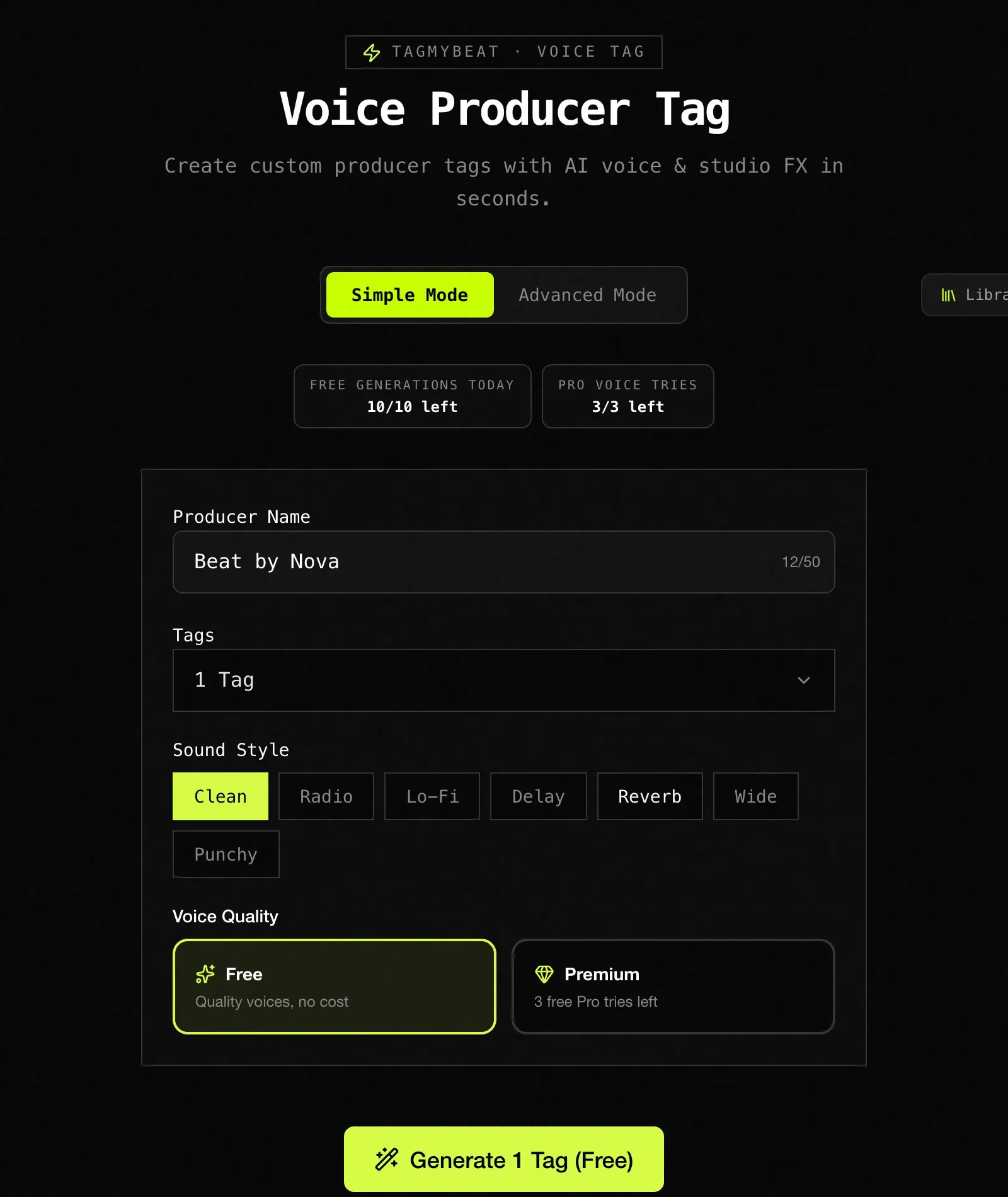
If you need a clean, hard-hitting beat tag right now without fiddling with complex audio knobs, Simple Mode is the fastest path from idea to downloadable audio.
How Simple Mode Works (Step-by-Step)
- Enter your tag name or phrase: Type your artist or producer name into the text box (e.g.,
Beat by NovaorMurda on the track). - Select your sound style preset: Choose from ready-to-use mixing chains designed specifically for beat intros:
- Clean: Natural, transparent vocal delivery without artificial coloration.
- Radio: Filtered telephone EQ with crisp mid-range cut.
- Lo-Fi: Warm, analog tape saturation and subtle high-frequency roll-off.
- Delay: Rhythmic echo repeats timed for smooth transitions.
- Reverb: Lush spatial ambience that floats over 808 glides.
- Wide: Stereo-widened vocal that hugs the sides of your mix.
- Punchy: Compressed vocal presence that punches through heavy drums.
- Choose Free or Pro Voice Quality: Toggle between Free standard voices or tap into Pro Voices for broadcast-tier clarity.
- Click Generate & Download: Hit Generate 1 Tag (Free), audition the audio instantly in your browser, and download the audio.
Pro Tip: Keep your Simple Mode phrases short (2 to 4 words). Shorter tags hit harder and leave plenty of headroom for your kick drum and 808 bass.
2. Advanced Mode: Deep Customization & Pro Emotion Control
When you want your tag to embody a specific persona—such as an energetic hype man, an airy female whisper, or a menacing drill presence—Advanced Mode gives you granular studio command.
How Advanced Mode Works (Step-by-Step)
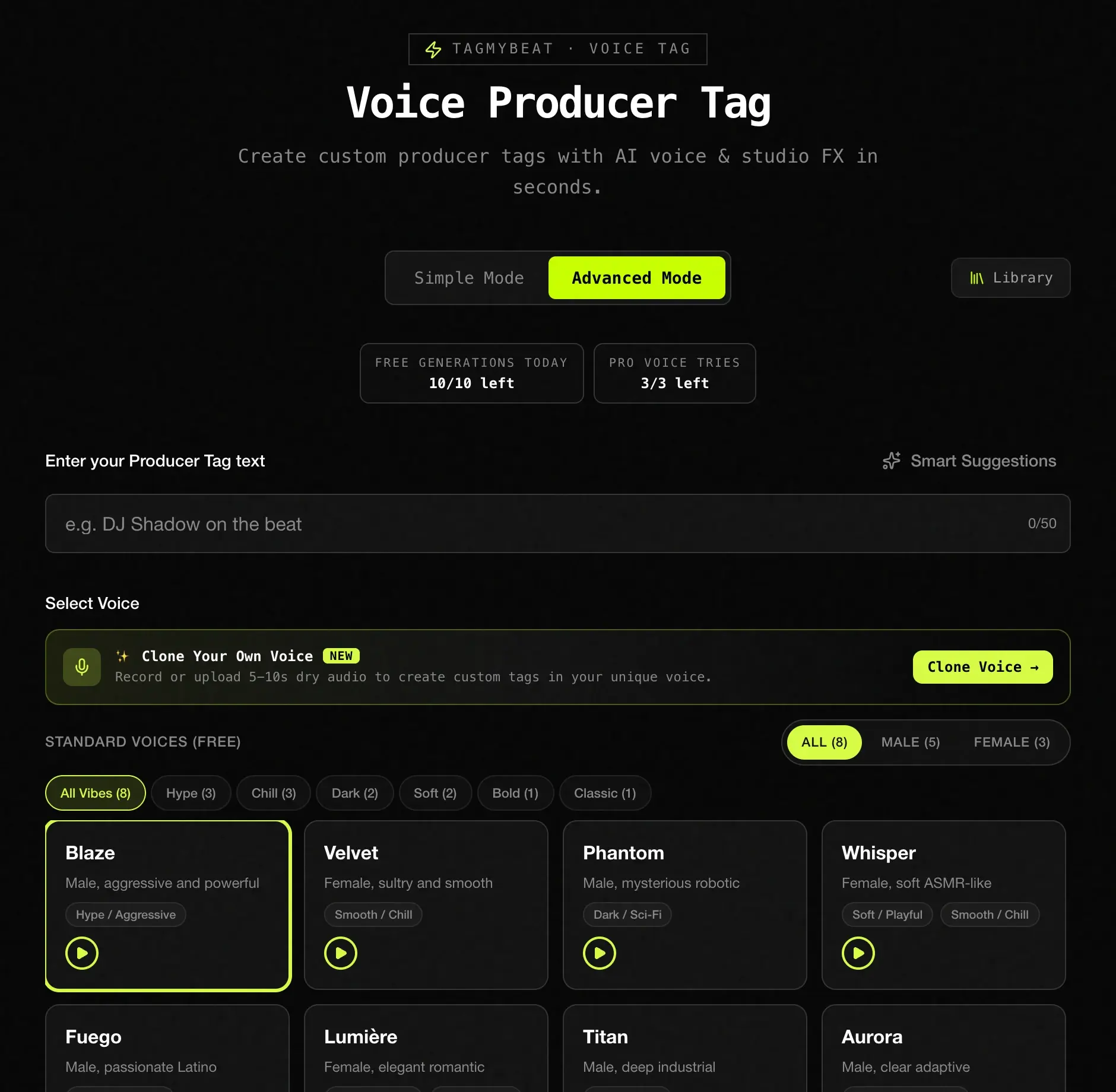
- Type your custom tag script: Enter your signature phrase, beat store disclaimer, or artist drop into the producer tag text field.
- Select your voice character: Browse distinct voice models categorized by gender, timbre, and musical genre:
- Female Styles (Velvet, Whisper, Nova): Breathy, silky, melodic pop and trap friendly.
- Male Styles (Blaze, Marcus, Titan): Authoritative, deep, or high-energy hip-hop hosts.
- Specialty & Anime Models: Futuristic, vocoded, or pitched vocal chops.
- Dial in Pro Emotion (Pro Feature): Vocal inflection changes how a tag lands. With Pro voices, you can dictate the exact emotional delivery:
- Hype: Maximum projection and urgency—perfect right before a heavy club drop.
- Whisper: Soft, intimate ASMR-style delivery that sounds close to the listener's ear.
- Chill: Relaxed, laid-back cadence made for lo-fi and neo-soul instrumentals.
- Dark: Deepened chest resonance engineered for dark drill and phonk beats.
- Neutral: Clean, professional broadcast delivery.
- Fine-tune parametric audio FX: Adjust pitch shift (down 1-3 semitones for a chopped-and-screwed feel), reverb space, delay repeats, and dynamic filters.
- Audition and Export: Compare multiple variations and download the final high-definition audio.
3. Clone Voice: Turn Your Own Voice into an AI Tag
Don't want to use standard AI voices that other producers might also use? Voice Cloning lets you build an AI model of your own real voice.
You record a short 5 to 10 second vocal sample using your computer or phone microphone. The AI analyzes your vocal timbre, pitch cadence, and accent. Once cloned, you can type any phrase you want, and your digital vocal twin will say it with studio FX applied.
How Voice Clone Works (Step-by-Step)
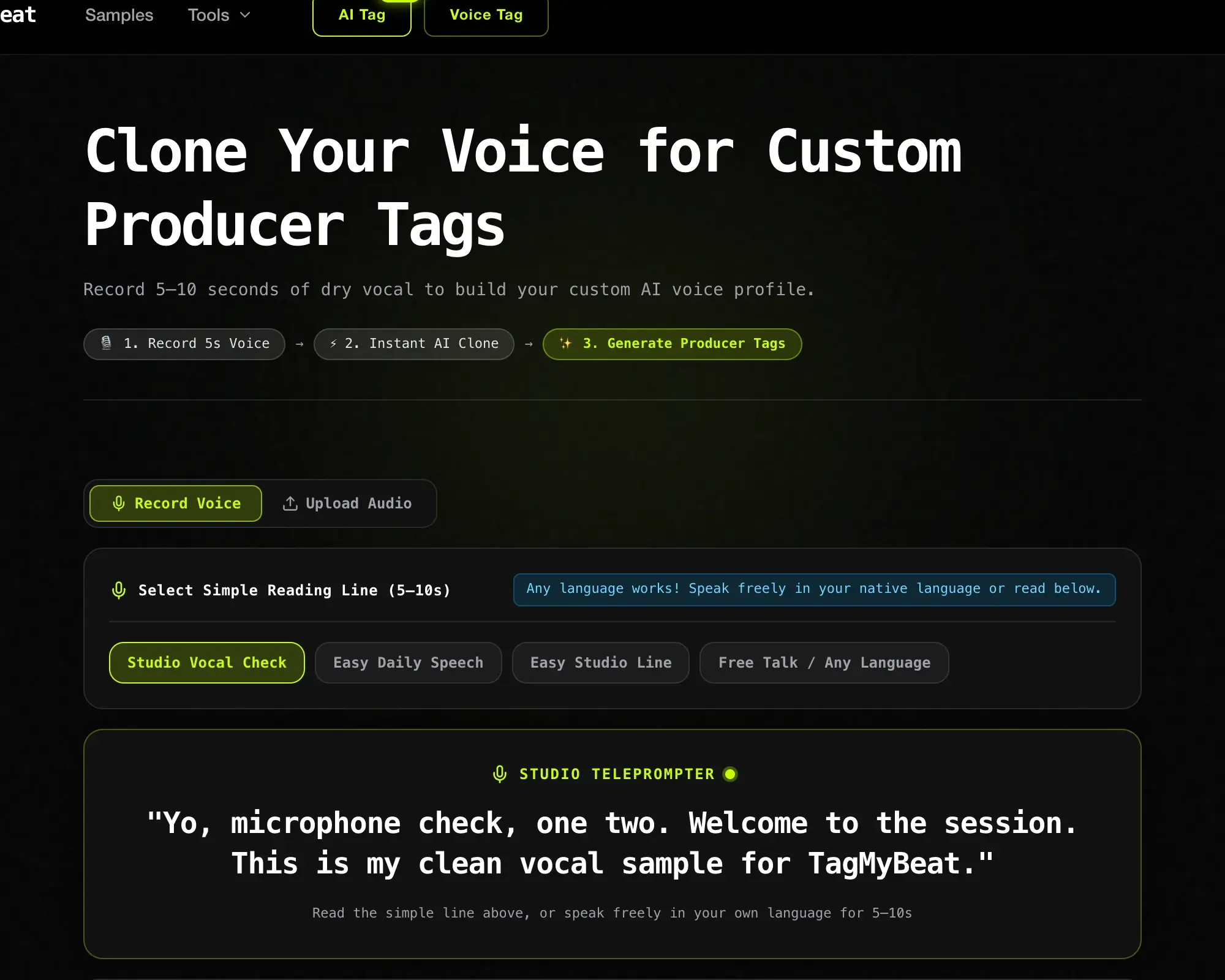
- Record a 5-10 second vocal sample: Click Record Voice (or upload an audio file). Read the on-screen teleprompter line clearly into your microphone in a quiet room:
- "Yo, microphone check, one two. Welcome to the session. This is my clean vocal sample for TagMyBeat."
- Instant AI voice generation: The neural engine trains a dedicated vocal profile in under 30 seconds.
- Type any custom tag script: Now type whatever tag line you imagine. You are not limited to what you originally recorded.
- Apply producer FX: Layer pitch shifting, reverb space, or stutter delays over your cloned voice to achieve that polished radio drop sound.
- Export & Own Your Sound: Download your custom tag knowing that no other producer in the world has your exact voice profile.
Voice Cloning Tip: Speak in a confident, steady tone during recording. Avoid fans, air conditioners, or background music while capturing your 5-second vocal sample.
4. AI Voice Tag (Prompt Mode): Cinematic & Musical Tags
Sometimes a dry voiceover is not enough. Modern trap, drill, and R&B beats often use musical tags—phrases backed by ambient synth pads, vinyl crackle, tape delays, reverse cymbal swells, and 808 sub rumble.
With AI Voice Tag (Prompt Mode), you describe the exact sonic aesthetic you want using natural language prompts. The AI synthesizes both the vocal performance and the accompanying musical textures simultaneously.
How AI Voice Tag Prompt Mode Works (Step-by-Step)
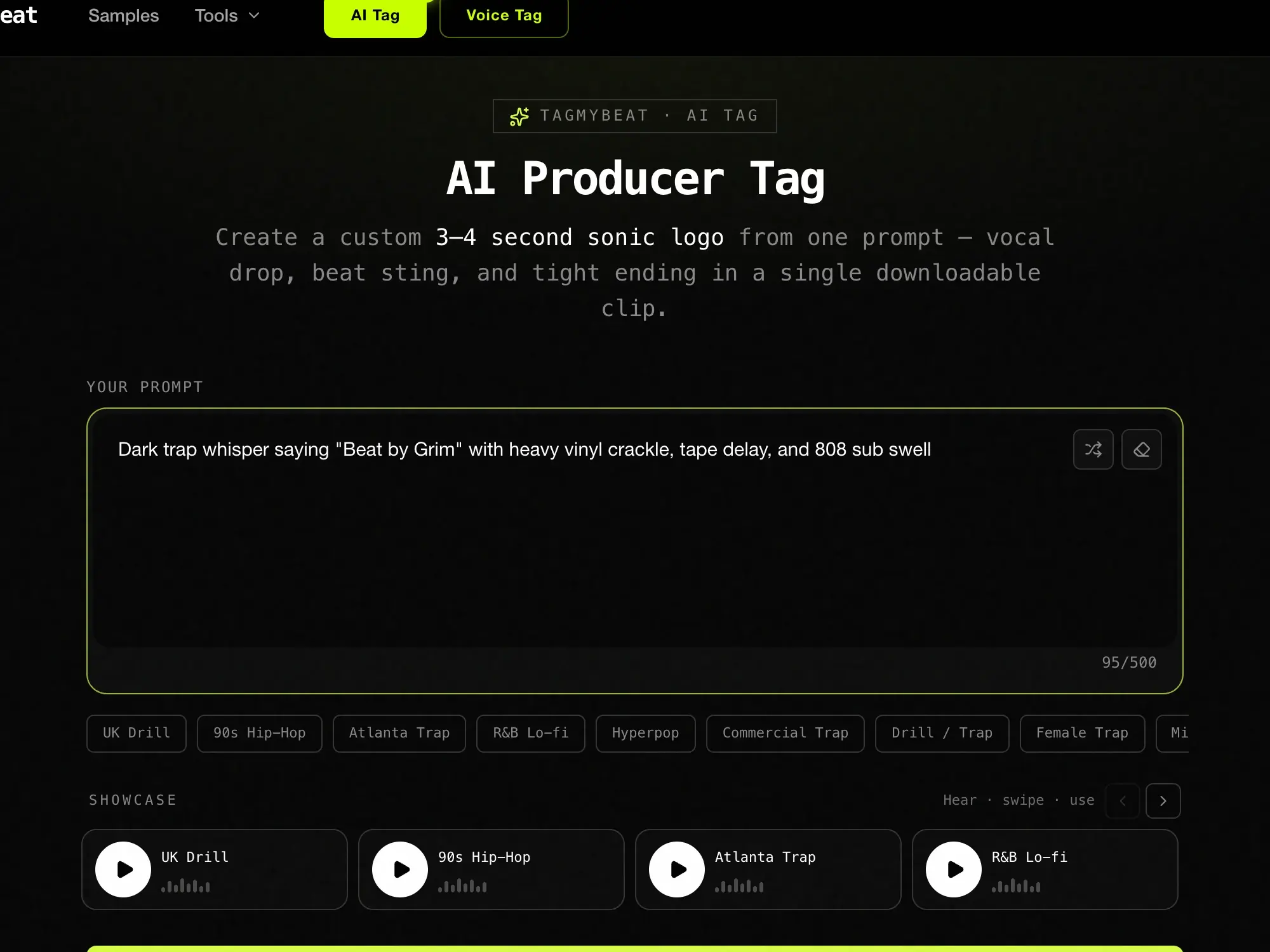
- Write your creative prompt: Describe the vocal character, spoken words, background music, and overall vibe.
- Pick style recipe chips: Click quick-inspiration tags such as UK Drill, Atlanta Trap, R&B Lo-fi, or Hyperpop to steer the sonic direction.
- Generate your sonic logo: The engine crafts a complete 3 to 4 second audio drop featuring vocal phrasing, musical stingers, and a clean ending.
- Audition and Download: Listen to the generated options and download your favorite file for your DAW.
The Ultimate AI Tag Prompt Formula
To get radio-ready results on your first attempt, follow this simple 4-part formula:
[Voice Character] + [Exact Spoken Phrase] + [Musical Accompaniment] + [Vibe / Genre]
Here are 4 copy-and-paste prompt templates:
| Genre | Copy-and-Paste Prompt Example | Sonic Character |
|---|---|---|
| UK Drill | Deep male gravelly voice saying "Beat by Grim", backed by a reverse reverb sweep, distorted sub bass, and metallic percussion. | Gritty, aggressive, heavy |
| R&B / Pop | Soft breathy female vocal whispering "Stay with me", layered with an airy choir pad, shimmer delay, and warm vinyl crackle. | Smooth, dreamy, expansive |
| Phonk / Trap | Memphis-style vocal chop shouting "Push the gas", pitch-shifted -3 semitones with cassette tape saturation and heavy drop. | Raw, high-energy, distorted |
| Lo-Fi Chillhop | Warm vintage radio announcer saying "Late night session", bandpass telephone filter with subtle electric piano chord. | Cozy, nostalgic, organic |
3 Mixing Tips for Placing Your Tag in FL Studio, Ableton & Logic
Having a great producer tag is only half the battle. If your tag is badly mixed, it can clash with your beat's bounce or distract from the artist's vocals.
- The 4-Bar Drop Placement: Place your producer tag at Bar 4, beat 3 or 4, right before the drums and 808 bass hit on Bar 5. The brief silence right as the tag ends makes the drop hit twice as hard.
- Carve Out the Low End: Always put a high-pass filter on your tag track (cut everything below 120 Hz). This prevents the vocal body from muddling your kick drum or sub bass.
- Set the Right Volume Level: Your tag should be clearly audible, but not louder than your snare or clap. Aim for -6 dB to -10 dB relative to your loudest drum transient.
Frequently Asked Questions
What words make a good producer tag?
The best tags are 2 to 5 words long. Combine your producer name with a memorable verb, question, or compliment (e.g., "Beat by [Name]", "[Name] on the track", "Did [Name] make this?"). Keep it punchy and easy to remember.
Can I make a producer tag for free online?
Yes. TagMyBeat offers free daily generations in Simple Mode and standard voices in Advanced Mode, allowing you to test, audition, and download tags without expensive studio equipment.
Do I own the copyright to tags generated with AI?
Yes. Tags generated and exported on TagMyBeat come with full commercial rights for your beat sales, BeatStars uploads, streaming releases (Spotify, Apple Music), and social media content.
Should I choose Simple Mode or Advanced Mode?
Use Simple Mode when you want a fast, high-impact tag in seconds. Use Advanced Mode when you want fine-grained control over individual voice models, emotional delivery (Hype, Whisper, Dark), and parametric FX sliders.
Start Making Your Producer Tag Today
Whether you want lightning-fast speed in Simple Mode, deep studio control in Advanced Mode, absolute originality with Voice Clone, or cinematic vibes with AI Voice Tags, TagMyBeat puts the entire audio branding studio in your browser.
Build your sonic signature and make your beats instantly recognizable.
Build Your Sonic Brand
Generate a custom producer tag in seconds.
Open the generator, choose from free or Pro voices, and create your signature beat tag today.
👉 Create Your Producer Tag for Free